

—-
—–
Full – DOC
—-
Full – ODT
—–
Full – PDF
—–
This is notebook descending order until day page is finished in notebook. Not required.
—–
6/15 – PDF
—–
6/14 – PDF
—–
6/13 – PDF
—–
6/12 – PDF
—–
6/11 – PDF
—–
6/10 – PDF
—–
6/9 – PDF
—–
6/8 – PDF
—–
6/7 – PDF
—–
6/6 – PDF
—–
6/5 – PDF
—–
6/4 – PDF
—–
6/3 – PDF
—–
6/2 – PDF
—–
6/1 – PDF
—–
—-
—–
Full – DOC
—-
Full – ODT
—–
Full – PDF
—–
This is notebook descending order until day page is finished in notebook. Not required.
—–
5/31 – PDF
—–
5/30 – PDF
—–
5/29 – PDF
—–
5/28 – PDF
—–
5/27 – PDF
—–
5/26 – PDF
—–
5/25 – PDF
—–
5/24 – PDF
—–
5/23 – PDF
—–
5/22 – PDF
—–
5/21 – PDF
—–
5/20 – PDF
—–
5/19 – PDF
—–
5/18 – PDF
—–
5/17 – PDF
—–
5/16 – PDF
—–
5/15 – PDF
—–
—–
Open Office Apache Writer / Calc Combo ->
https://www.openoffice.org/download/
(It doesn’t matter; the button Download Full Version is the only thing that you do. If you need the “I don’t speak or read English” (language pack), the button on the right is your 2nd download.)
——-
ALERT: What you are staring at is a UNCHECK BORDER 1st 2 column 3 row document table.
ALERT: What OTHER PEOPLEs are staring at is a UNCHECK BORDER 1st 2 column 1 row document table.
ALERT: What OTHER PEOPLEs do besides CTRL+A/SELECT ALL/HIGHLIGHT_COLUMN DELETE UNDO for Garble Goo… is contact software professionals to CREATE A BETTER OPTION on CYCLES.
SWEAR JAR ALERT: Nothing on this earth makes the SWEAR JAR larger than a very Very VERY fast computer WITHOUT WIFI or ANYTHING ELSE RUNNING that has encountered an ERROR on multiple page TEXT document…. POSS-SEE-BLAY… a REOPEN RECOVER SAVE CLOSE REOPEN W/NO NEED TO RECOVER.
–
New Writer Document -> PRESS FORMAT PAGE LANDSCAPE REMOVE BORDER (Maybe Tab None)… 🙂 – I PUT LIKE .25 IN ALL MARGINS – OTHER PEOPLE MAKE A MARGIN FOR HANDWRITING ON 1 SIDE. GOOD LUCK WITH YOUR MATHS. Won’t affect too much on the right column.
–
1. Insert the table -> UNCHECK BORDER 1st 2 column 3 row document table. On top, fix the width.
–
2. COLUMN 1 ROW 2: put cursor, insert new table, UNCHECK BORDER 1st 1 column 25 rows.
–
3. COLUMN 2 ROW 2: put cursor, insert new table, UNCHECK BORDER 1st 2 column 25 rows. 1st cell row 1. highlight – right click – width. 2nd cell not important. If you add the 3rd cell, column 1 doesn’t have to be 1.5.
–
If you can remove the border after you’ve made the table or rows, then you’ve hit God Mode. Pat yourself for the fallen.
–
If you go to the bottom, you can press insert page break. Birdies say, Intentionally left blank, insert page break…. copy 1st one or open the already made one… paste it and do again.
–
A special thanks to the printer people. If you put margin .01, they will NEVER EVER let you print it without…. adding some more automatically. You’ll always win with “the printer people from 1970s and 80s!”
——
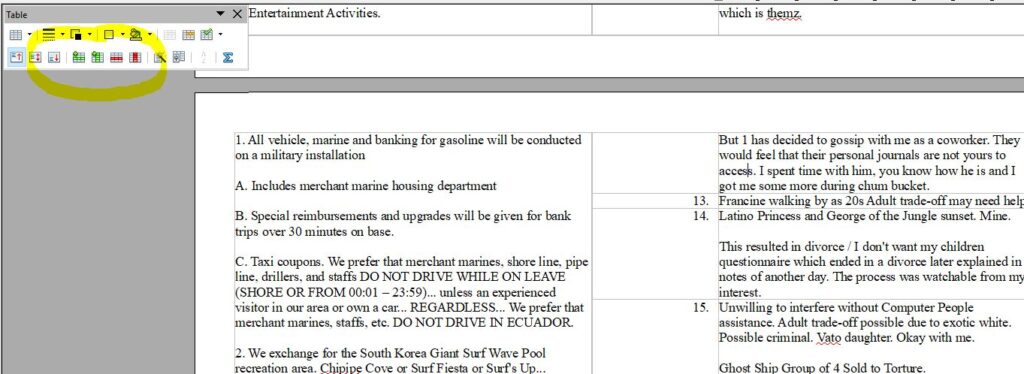
——
In ODT or DOC, you may see this Table View Window.
If you press the first green line, it will add a row for notes.
If you press the 2nd green line, it will add a column for notes. Use at your own risk. That means the top cell, right click, width, OR highlight all column with shift down/page down, right click number format, text, okay. (or your numbering period . may disappear on right)
—-
—–
Relax. If your print preview shows a scrunch, then try rotate all 90 degrees. It is printed sideways but all good.
—-
If you do not like to find end of your table, use cursor to press enter, INSERT MANUAL BREAK PAGE BREAK; then just FILE Export as PDF and use a blank page on the back.
Legally, we do write “this page is intentionally left blank” with no capital and no period.
Other professions, use the clause as an ALL CAPS.
You can staple a blank page at the end or just write your own notes on the subject matter on your desk OR by adding a row and using a different color in italics or something the whole time.
—–
NOTE TAKING IN SPREADSHEET GENIUSES READ HERE:
If you do choose FILE EXPORT AS PDF, then the GOD MODE is page and 1-6, 10-17, etc.
You can export my notebook when not required, and your notes right there for your bath-time reading.
(I have read a ton of college handouts in Philosophy Class in my 20s apartment with porcelain tub. I got an A. I miss them sometimes.)
—–
NOTE: Consider it a few days difference as I may make an adjustment on the following day. I do know that late at night I skipped a fractal. Morning energy fixes these things with constant bothering of a perfectionist.
God Mode 3.0 would just be 2 New Writer Documents for the time being:
One window dragged by mouse on top bar to the left side of screen.
One more open by clicking in explorer the name of 2nd file…. dragged by mouse on top bar to the right side of the screen…. A few days later, its a safer environment.
—–
These Instructions will commonly be seen in reverse order as June will be above when notes are not required.
—–